

The Ring Battery Doorbell 2K caught my attention for one simple reason: it brings 2K video to a battery-powered Ring doorbell without making installation feel like a major home project. That sounds small, but it matters if you rent, do not have useful doorbell wiring, or simply do not want to spend an afternoon running cables.
I also think this is a product where the small details matter more than the headline resolution. Ring lists 2K video, head-to-toe coverage, 6x enhanced zoom, night vision, two-way talk, motion detection, and a built-in rechargeable battery. It also uses 2.4GHz Wi-Fi, so there are a few practical limits worth knowing before buying.

My Ring Battery Doorbell 2K Review Starts With the 2K Camera
The biggest change here is obvious on paper. The Ring Battery Doorbell 2K records at 1920 × 1920 resolution, giving it a square image that is designed to show more of the area around your door.
That shape is useful because a traditional wide image can miss the package sitting directly below the camera. Ring says the camera offers a 140-degree horizontal and vertical field of view, with a 173-degree diagonal view.
Is 2K actually useful on a doorbell?
Yes, but I would not buy it for the number alone.
A higher-resolution camera is most useful when you need to look closely at a face, package, label, or other small detail. Ring also includes up to 6x enhanced zoom, which can make that extra image detail more useful.
| What I care about | Why it matters |
| 2K resolution | Gives recordings more visible detail |
| Square 1920 × 1920 view | Helps capture people and packages |
| 6x enhanced zoom | Useful when checking small details |
| Head-to-toe coverage | Reduces the chance of missing something below the camera |
One thing I would keep in mind is internet speed. Ring recommends at least 10 Mbps upload speed for its 2K devices, and actual video quality can vary with bandwidth.
So, if your Wi-Fi is weak near the front door, the 2K label alone will not magically fix the problem.
The Head-to-Toe View Is More Useful Than I Expected
This is one of those features that sounds like marketing until you think about everyday use.
Imagine someone standing at your door with a delivery box. A normal horizontal view may show their face clearly while cutting off the package at their feet. The taller image from the Battery Doorbell 2K is designed to avoid that problem.
I like the idea because most doorbell cameras are not really being used to admire scenery. They are there to show who is at the door and what is happening around the doorstep.
Where the tall view helps most
The head-to-toe format makes the most sense for front doors, apartment entrances, porches, and narrow walkways.
| Situation | Why the 2K view helps |
| Package delivery | Shows the person and package together |
| Visitor at the door | Gives a fuller view of their body |
| Narrow entrance | Uses vertical space efficiently |
| Someone approaching | Provides more useful context around the door |
I would still check your mounting position before buying. A camera can have a very wide field of view and still perform poorly if a wall, roof, railing, or nearby object blocks part of it.
That is a lesson I have learned with home cameras in general: camera placement often matters more than another specification on the box.
Ring Battery Doorbell 2K Battery Life Is the Part I’d Watch Closely
The built-in rechargeable battery makes installation easier, but it also creates the one maintenance task that wired users can avoid: charging.
Ring lists the Battery Doorbell 2K as using a built-in lithium-ion battery. It can also be connected to compatible existing doorbell wiring for trickle charging, and Ring says it can work with compatible solar accessories.
What I would not do is assume there is one universal battery-life number.
Your battery life can change based on motion activity, Wi-Fi conditions, temperature, how often Live View is used, and how frequently the camera records events.
What can drain the battery faster?
Busy streets are a good example. If the camera sees cars, people, pets, shadows, and movement all day, it has much more work to do than a door facing a quiet private path.
| Battery drain | What I would change |
| Too many motion alerts | Narrow the motion zones |
| Very busy entrance | Lower unnecessary motion sensitivity |
| Frequent Live View use | Use live viewing only when needed |
| Weak Wi-Fi | Improve the router or network position |
I would also resist the temptation to make the motion zone cover everything just because the camera can see everything.
A doorbell is supposed to alert you about useful activity. It does not need to report every person walking down the street.
The 2.4GHz Wi-Fi Limitation Deserves Attention
This is probably one of the less exciting parts of a Ring Battery Doorbell 2K review, but it is important.
The current model uses single-band 2.4GHz Wi-Fi and Wi-Fi 4. Ring recommends at least 10 Mbps upload speed for its 2K devices.
The advantage of 2.4GHz is range. It can often travel farther and pass through walls better than 5GHz.
The downside is that it is an older, slower wireless standard.
What I would check before installation
Before blaming the doorbell for poor video, I would check the Wi-Fi signal at the actual mounting location.
| Symptom | Likely place to investigate |
| Live View loads slowly | Wi-Fi strength or internet upload speed |
| Video quality drops | Available bandwidth |
| Alerts arrive late | Wi-Fi or network congestion |
| Connection keeps failing | Router range or interference |
This is another mistake that is easy to make: testing Wi-Fi beside the router and assuming it will behave the same way beside the front door.
It may not.
If the door is far from the router, I would solve the network problem first rather than expecting the camera to compensate for it.
Installing the Ring Battery Doorbell 2K Looks Refreshingly Simple
One of the strongest reasons to consider the battery model is installation.
Ring lists an estimated installation time of about 10 minutes and includes the mounting plate, hardware, tools, setup guide, and security sticker.
That does not mean every installation will take 10 minutes. Existing holes, awkward siding, brick, concrete, or a badly positioned door frame can turn a simple job into a more annoying one.
Still, the basic idea is renter-friendly.
Battery installation versus wiring
I would choose based on how much maintenance I want.
| Setup | Best for |
| Battery only | Renters and simple installations |
| Existing doorbell wiring | People who want ongoing trickle charging |
| Solar accessory | Locations with suitable sunlight |
Ring says existing doorbell wiring can be used within its specified low-voltage requirements, while solar charging is also supported with compatible Ring accessories.
For me, that flexibility is a real advantage. You can start with battery power and consider another charging method later.
Night Vision Matters More Than Daytime 2K
A doorbell camera can look fantastic at noon and become disappointing after sunset.
The Battery Doorbell 2K includes night vision, and Ring says the camera is designed for improved low-light performance.
That is important because many security events happen when the lighting is not ideal.
What I would realistically expect at night
I would expect the camera to give useful information about who is at the door, but I would not assume that 2K guarantees perfect facial detail in darkness.
Bright porch lights can help. So can good camera placement.
| Night condition | Expected result |
| Good porch lighting | Better face and clothing detail |
| Very dark entrance | Night vision becomes more important |
| Bright light behind visitor | Face may appear darker |
| Camera facing reflective surfaces | Possible glare or washed detail |
This is why I would judge the camera as a security tool, not as a replacement for proper outdoor lighting.
Motion Detection Needs Some Setup Time
Motion detection sounds simple: movement happens, the camera alerts you.
In real life, it is rarely that simple.
A good doorbell needs to detect useful movement without constantly announcing every passing car or tree branch. Ring provides customizable motion zones and motion sensitivity controls, which give you some control over that balance.
My biggest motion-detection tip
Start conservatively.
I would rather receive fewer useful alerts than dozens of notifications that train me to ignore the Ring app.
| Common mistake | Better approach |
| Covering the whole street | Focus on the property entrance |
| Maximum sensitivity | Increase it only if needed |
| Ignoring repeated alerts | Identify the source and adjust zones |
| Leaving default settings forever | Fine-tune after watching real activity |
The first few days are when I would pay the most attention. That is when you learn what your particular doorway looks like from the camera’s point of view.
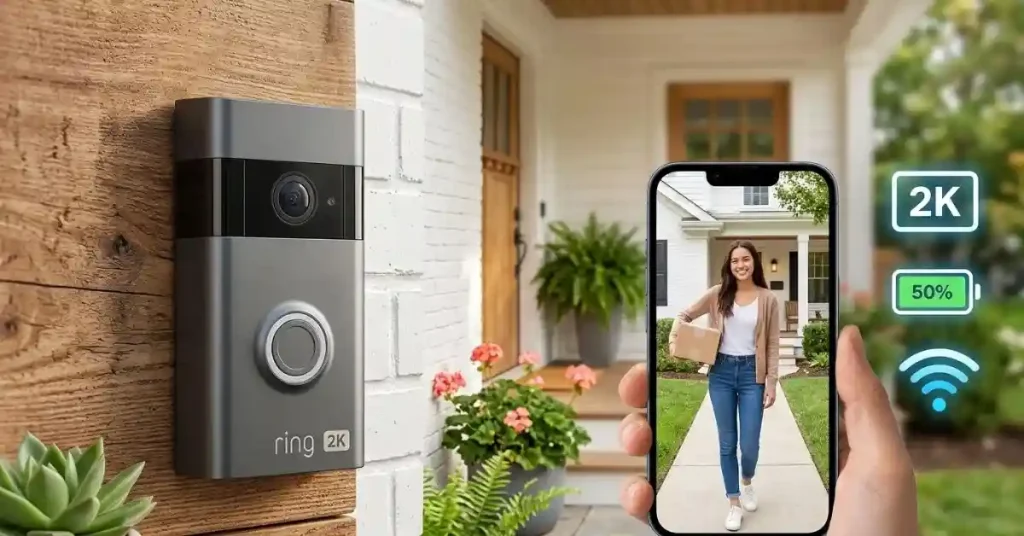
Two-Way Talk Is Handy, but Expectations Matter
The Battery Doorbell 2K supports Live View and two-way talk, so you can speak with someone at the door through the Ring app.
I see this as one of those features that becomes more useful the longer you have a doorbell camera.
A delivery driver arrives while you are upstairs. A neighbor wants to know if you are home. Someone is standing at the door while you are away.
You do not always need to open the door.
The important thing is remembering that this is still an internet-connected conversation. Wi-Fi quality and network delay can affect how natural the conversation feels.
The Ring Subscription Question Should Not Be Ignored
This is the part I would check before buying any Ring doorbell.
The hardware is only one part of the overall experience. Ring’s recorded video features are tied to a Ring Protect subscription, according to Ring’s product information.
That means you should not look only at the purchase price.
Hardware cost versus ongoing cost
| Cost area | What to consider |
| Doorbell | One-time hardware purchase |
| Ring Protect | Subscription for supported recording features |
| Accessories | Optional mounts, chargers, or solar equipment |
This does not automatically make the doorbell a bad value. It simply changes the calculation.
If you only want live viewing and alerts, your needs may be different from someone who wants a searchable history of recorded events.
I would make that decision before purchasing rather than discovering it after installation.
Ring Battery Doorbell 2K: What I Like and What Gives Me Pause
After looking at the feature set as a whole, I think the product makes the most sense for people who want a relatively simple battery-powered entry camera with better resolution than older basic Ring models.
The strongest parts are not just the 2K number. It is the combination of 2K video, the square head-to-toe view, enhanced zoom, rechargeable battery, motion controls, and flexible installation.
| What I like | Why it stands out |
| 2K square video | Better suited to door-level viewing |
| Battery operation | Easier installation |
| Head-to-toe coverage | Useful for people and packages |
| 6x enhanced zoom | Helps inspect captured details |
| Existing wiring support | Can reduce charging hassle |
The concerns are just as practical.
The single-band 2.4GHz connection may not suit every network setup. Battery charging remains part of ownership. And subscription costs can change the long-term value for people who want recorded video.
| Potential drawback | Why it matters |
| Rechargeable battery | Requires periodic charging |
| 2.4GHz-only Wi-Fi | Less flexible than dual-band designs |
| Subscription features | Adds an ongoing ownership cost |
| Placement still matters | Good specs cannot fix a bad angle |
A Few Ring Battery Doorbell 2K Mistakes I Would Avoid
The easiest way to get frustrated with a smart doorbell is to expect the camera to solve problems that actually come from installation or settings.
I would avoid mounting it too high, pointing it directly toward a strong light source, or leaving motion detection at aggressive settings without checking the results.
I would also avoid judging the camera’s battery life after only a short period. Battery performance is strongly tied to how busy the entrance is and how the device is configured.
The simple setup routine I would use
First, mount the camera where it can see both a visitor and the doorstep. Then check the live view from a few different positions.
Next, adjust motion zones. After that, watch the notifications for several days before making more changes.
That small amount of patience can make a bigger difference than constantly changing settings at random.
Is the Ring Battery Doorbell 2K Worth It?
For the right home, I think it makes a lot of sense.
If you want a battery-powered Ring doorbell with 2K video, a tall field of view, motion detection, two-way talk, and a relatively simple installation, the feature set is well balanced. Ring currently identifies this model as the 2026 Battery Doorbell 2K, with the earlier Battery Doorbell 2nd Gen name referring to the same feature set.
I would be more cautious if your main concern is avoiding subscriptions, you have unreliable Wi-Fi at the front door, or you strongly prefer a wired doorbell with no battery maintenance.
The product is not magic. A good camera still needs a good mounting position, decent network coverage, sensible motion settings, and realistic expectations about night video.
Final Thoughts on My Ring Battery Doorbell 2K Review
My biggest takeaway is that the Ring Battery Doorbell 2K is about more than simply upgrading from HD to 2K. The square head-to-toe image, enhanced zoom, battery design, and flexible power options make the format more practical for a real front door.
The biggest lesson I would keep in mind is to look beyond the camera resolution. Check your Wi-Fi, think about where the camera will sit, decide whether you are comfortable charging a battery, and understand which features depend on a Ring Protect plan.
If those points fit your situation, this is a much more interesting doorbell than the “2K” label alone suggests. And honestly, that is how I would judge it: not by the biggest number on the box, but by whether it quietly does the everyday job you bought it to do.
To Get More About Home, Product Reviews Product You Can Visit Our Site. If You Found our Posts Helpful Leave a Comment Below